JTImageLabel 1.0.2
| TestsTested | ✗ |
| LangLanguage | Obj-CObjective C |
| License | MIT |
| ReleasedLast Release | Dec 2015 |
Maintained by Jonathan Vukovich Tribouharet.
JTImageLabel 1.0.2
- By
- Jonathan Tribouharet
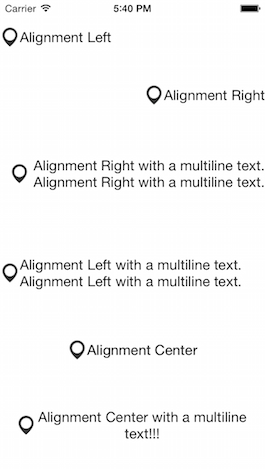
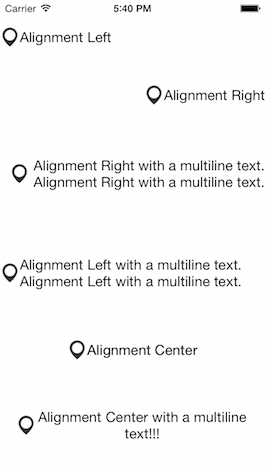
JTImageLabel is a simple view which contain a UILabel and a UIImageView which stay side by side, even if you change the alignment of the UILabel.
Installation
With CocoaPods, add this line to your Podfile.
pod 'JTImageLabel', '~> 1.0'
Screenshots
Usage
It's very easy to use.
#import <UIKit/UIKit.h>

#import "JTImageLabel.h"

@interface ViewController : UIViewController

@property (weak, nonatomic) IBOutlet JTImageLabel *label;

@end
You can access directly to the imageView and the textLabel.
Also you can define the space between the two views.
@implementation ViewController

- (void)viewDidLoad
{
    [super viewDidLoad];

    self.label.imageView.image = [UIImage imageNamed:@"icon"];
    self.label.textLabel.text = @"Test";
    self.label.textLabel.textAlignment = NSTextAlignmentRight;
    self.label.space = 10.; // Add a space between the imageView and the textLabel
}
You cannot change the frame of the imageView and the textLabel. The imageView has the same size as this image and the textLabel adapts to its relative content.
Requirements
- iOS 7 or higher
- Automatic Reference Counting (ARC)
Author
License
JTImageLabel is released under the MIT license. See the LICENSE file for more info.