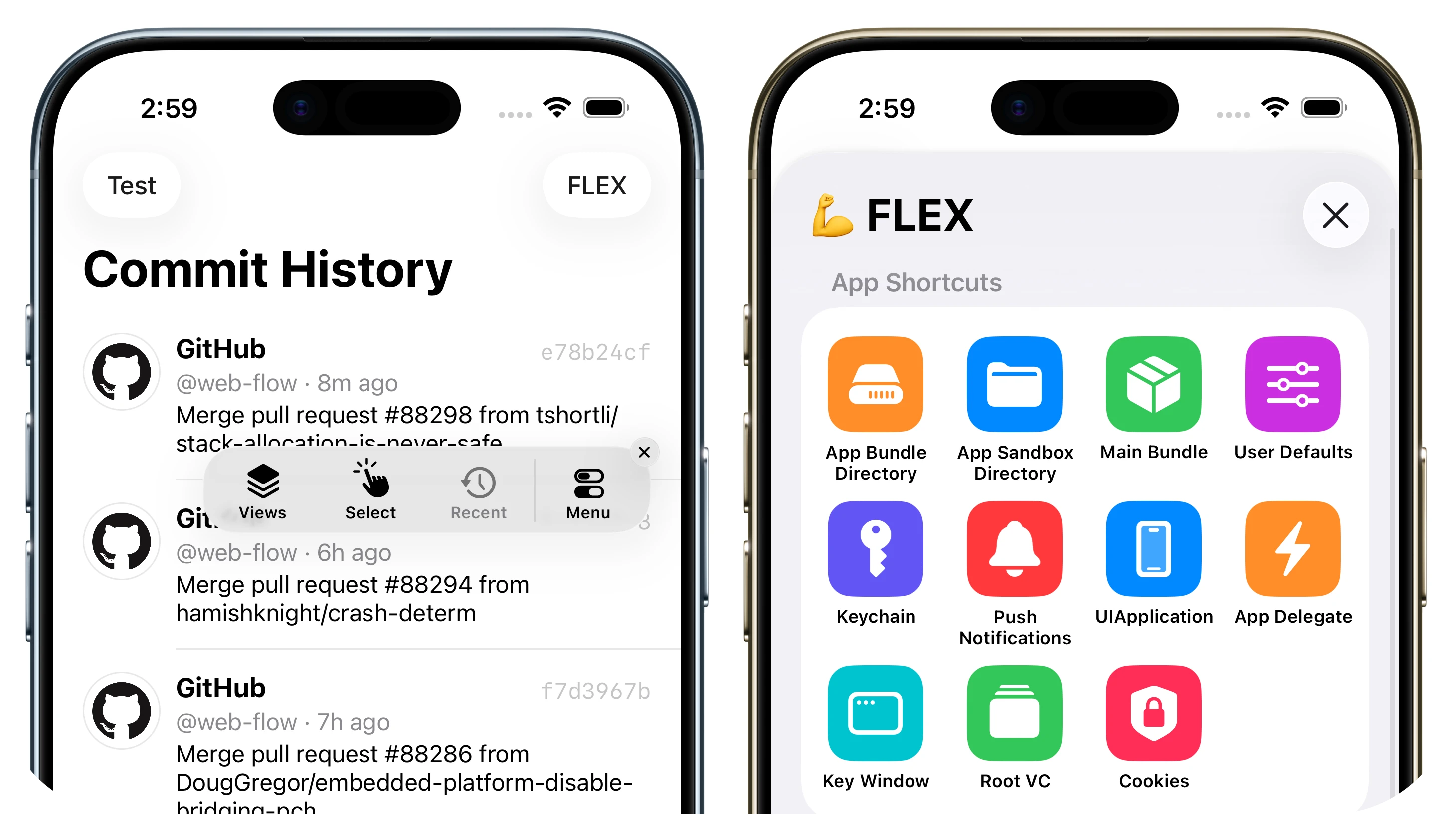
FLEX (Flipboard Explorer) is a set of in-app debugging and exploration tools for iOS development. When presented, FLEX shows a toolbar that lives in a window above your application. From this toolbar, you can view and modify nearly every piece of state in your running application.
fleXD is my own personal fork of the original FLEX framework. I'd been using FLEX heavily during my time at Instagram, and it was absolutely indispensible when working on the Instagram for iPad project. That being said, the toolbar's edge-to-edge design felt quite strange on large iPad screens, and in general, the look of the framework has slowly started to show its age, especially now that iOS 26 has arrived.
Since I had a very different vision of how I think FLEX should look and feel in 2026, instead of barging in and submitting an absolute mountain of PRs to the original repo that might blindside many users, I thought I'd keep things separate for now so I can experiment at my own leisure. But I'm certainly open to submitting these changes back upstream if there's demand!
In any case, feel free to play with this version and let me know what you think!
- Inspect and modify views in the hierarchy.
- See the properties and ivars on any object.
- Dynamically modify many properties and ivars.
- Dynamically call instance and class methods.
- Observe detailed network request history with timing, headers, and full responses.
- Add your own simulator keyboard shortcuts.
- View system log messages (e.g. from
NSLog). - Track live
NSNotificationCenterobservers and spot ones left registered after deallocation. - Access any live object via a scan of the heap.
- View the file system within your app's sandbox.
- Browse SQLite/Realm databases in the file system.
- Trigger 3D touch in the simulator using the control, shift, and command keys.
- Explore all classes in your app and linked systems frameworks (public and private).
- Quickly access useful objects such as
[UIApplication sharedApplication], the app delegate, the root view controller on the key window, and more. - Dynamically view and modify
NSUserDefaultsvalues.
Unlike many other debugging tools, FLEX runs entirely inside your app, so you don't need to be connected to LLDB/Xcode or a different remote debugging server. It works well in the simulator and on physical devices.
In the iOS simulator, you can use keyboard shortcuts to activate FLEX. f will toggle the FLEX toolbar. Hit the ? key for a full list of shortcuts. You can also show FLEX programmatically:
Short version:
// Objective-C
[[FLEXManager sharedManager] showExplorer];
// Swift
FLEXManager.shared.showExplorer()More complete version:
#if DEBUG
#import "FLEXManager.h"
#endif

...

- (void)handleSixFingerQuadrupleTap:(UITapGestureRecognizer *)tapRecognizer
{
#if DEBUG
    if (tapRecognizer.state == UIGestureRecognizerStateRecognized) {
        // This could also live in a handler for a keyboard shortcut, debug menu item, etc.
        [[FLEXManager sharedManager] showExplorer];
    }
#endif
}fleXD requires an app that targets iOS 15 or higher. To run the Example project, simply open the Xcode project in the Example folder. The project will import the local copy of FLEX automatically via Swift Pacakage Manager.
Include the dependency in the dependencies value of your Package.swift
dependencies: [
    .package(url: "https://github.com/TimOliver/fleXD.git", .upToNextMajor(from: "6.0.0"))
]
Next, include the library in your target:
.target(
    name: "YourDependency",
    dependencies: [
        .product(name: "FLEX", package: "fleXD")
    ]
)Add fleXD to your Podfile and run pod install:
pod 'fleXD'Until fleXD is published to CocoaPods trunk, reference it directly from git:
pod 'fleXD', :git => 'https://github.com/TimOliver/FLEXD.git', :tag => '6.1.0'
Remember to exclude fleXD from your Release (App Store) builds — see below.
Manually add the files in Classes/ to your Xcode project, or just drag in the entire FLEX/ folder. Be sure to exclude FLEX from Release builds or your app will be rejected.
Add the following flags to to Other Warnings Flags in Build Settings:
-Wno-deprecated-declarations-Wno-strict-prototypes-Wno-unsupported-availability-guard
FLEX makes it easy to explore the internals of your app, so it is not something you should expose to your users. Fortunately, it is easy to exclude FLEX files from Release builds. The strategies differ depending on how you integrated FLEX in your project, and are described below.
Wrap the places in your code where you integrate FLEX with an #if DEBUG statement to ensure the tool is only accessible in your Debug builds and to avoid errors in your Release builds. For more help with integrating FLEX, see the example project.
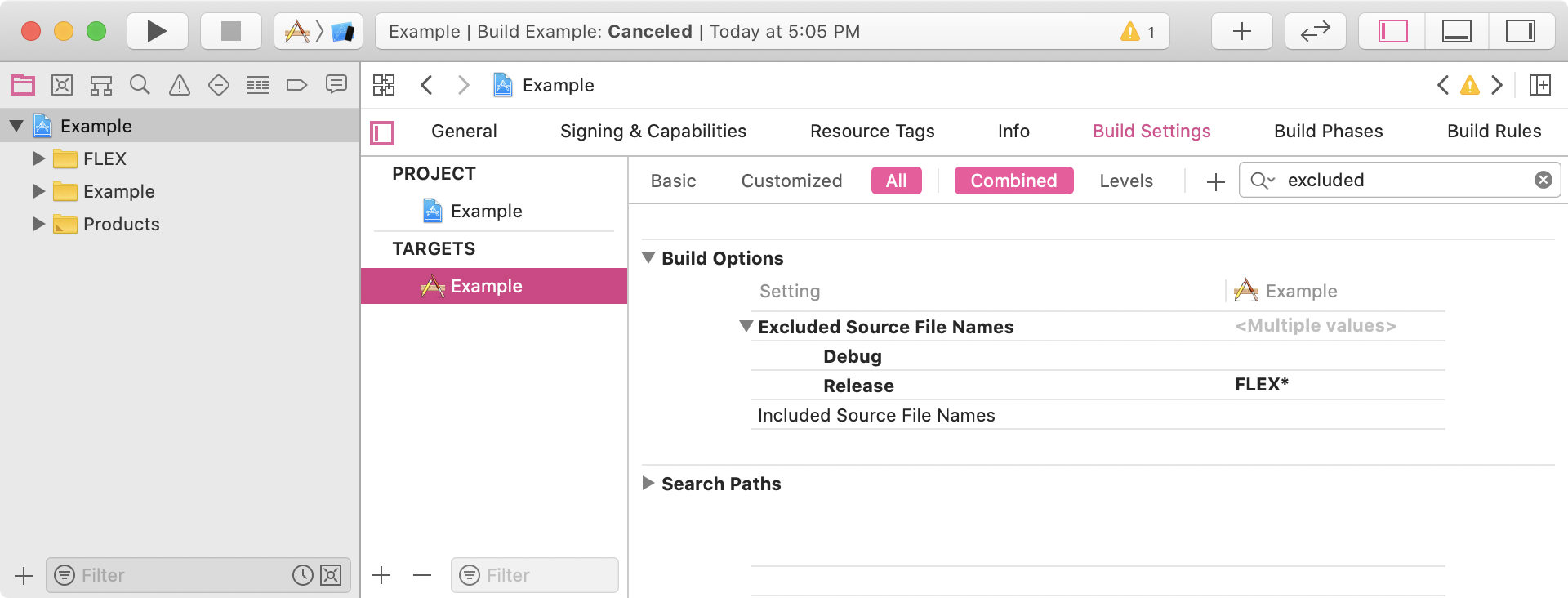
In Xcode, navigate to Build Settings > Build Options > Excluded Source File Names. For your Release configuration, set it to FLEX* like this to exclude all files with the FLEX prefix:

In Xcode, navigate to Build Settings > Build Options > Excluded Source File Names. For your Release configuration, set it to FLEX* like this to exclude all files with the FLEX prefix:
- When setting fields of type
idor values inNSUserDefaults, FLEX attempts to parse the input string asJSON. This allows you to use a combination of strings, numbers, arrays, and dictionaries. If you want to set a string value, it must be wrapped in quotes. For ivars or properties that are explicitly typed asNSStrings, quotes are not required. - You may want to disable the exception breakpoint while using FLEX. Certain functions that FLEX uses throw exceptions when they get input they can't handle (i.e.
NSGetSizeAndAlignment()). FLEX catches these to avoid crashing, but your breakpoint will get hit if it is active.
Pronounced 'Flecks-Dee'.
I figured I needed some differentiator from the name FLEX, but FLEX is already such a great name that I didn't want to stray too far from it. I had noticed that a lot of the names in the library love to use puns. The sample app is called FLExample, and there is a file named FLExtensions in there as well.
My favourite millienial emoji is 'XD', the sometimes cheesy cheeky grin emoji. And so, this library is named after that. XD
A an absolutely massive thanks to Ryan Olsen, Tanner Bennett and everyone else who has been building and supporting FLEX all these years.
In addition, FLEX builds on ideas and inspiration from open source tools that came before it. The following resources have been particularly helpful:
- MirrorKit: an Objective-C wrapper around the Objective-C runtime.
- DCIntrospect: view hierarchy debugging for the iOS simulator.
- PonyDebugger: network, core data, and view hierarchy debugging using the Chrome Developer Tools interface.
- Mike Ash: well written, informative blog posts on all things obj-c and more. The links below were very useful for this project:
- MAObjCRuntime
- Let's Build Key Value Coding
- ARM64 and You
- RHObjectiveBeagle: a tool for scanning the heap for live objects. It should be noted that the source code of RHObjectiveBeagle was not consulted due to licensing concerns.
- heap_find.cpp: an example of enumerating malloc blocks for finding objects on the heap.
- Gist from @samdmarshall: another example of enumerating malloc blocks.
- Non-pointer isa: an explanation of changes to the isa field on iOS for ARM64 and mention of the useful
objc_debug_isa_class_maskvariable. - GZIP: A library for compressing/decompressing data on iOS using libz.
- FMDB: This is an Objective-C wrapper around SQLite.
- InAppViewDebugger: The inspiration and reference implementation for FLEX 4's 3D view explorer, by @indragiek.