


Example
To run the example project, clone the repo, and run pod install from the Example directory first.
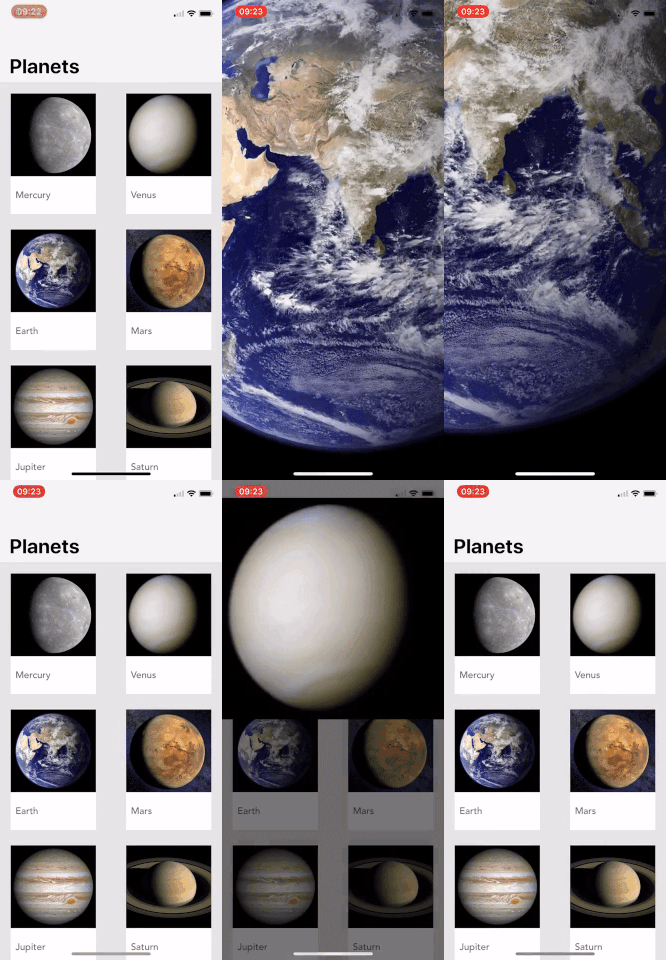
Requirements
Installation
SwiftPic is available through CocoaPods. To install it, simply add the following line to your Podfile:
pod 'SwiftPic'Usage
Presenting the ImageViewController
let imageDetail = ImageViewController(configuration: configuration)
imageDetail.modalPresentationStyle = .custom
imageDetail.transitioningDelegate = self

present(imageDetail, animated: true, completion: nil)
Configuration
The ImageViewController class requires an instance of ImageViewControllerConfiguration.
// The UIImage objects to display
let galleryImages = [image1, image2, ...]

// startIndex is 0 by default
let configuration = ImageViewControllerConfiguration(images: galleryImages, startIndex: 1)


// Optional closure called when image index changes, imeplement this to show/hide images
// when using the transition delegates
configuration.imageIndexChanged = { [weak self] index in
	// Called each time the index updates
}

// Optional closure called when a new title is needed for an index change.
// Ignoring this will remove the title entirely
configuration.titleForImageAtIndex = { [weak self] index in
	// return new title if required
}
Transitioning
SwiftPic has built in transitions, all you need to do is return the associated objects when using UIViewControllerTransitioningDelegate.
Both ImageViewerAnimatorPresenting and ImageViewerAnimatorDismissing require a UIImageview instance to determine where to animate
from and to. Note that this shoud be changed when the gallery changes.
extension MyUIViewController: UIViewControllerTransitioningDelegate {

    func animationController(forPresented presented: UIViewController, presenting: UIViewController, source: UIViewController) -> UIViewControllerAnimatedTransitioning? {
        return ImageViewerAnimatorPresenting(originImageView: selectedImageView, animationTime: 0.5)
    }

    func animationController(forDismissed dismissed: UIViewController) -> UIViewControllerAnimatedTransitioning? {
        return ImageViewerAnimatorDismissing(originImageView: selectedImageView, animationTime: 0.4)
    }
}
UICollectionView example (from the Example project)
    override func collectionView(_ collectionView: UICollectionView, didSelectItemAt indexPath: IndexPath) {
        if let cell = collectionView.cellForItem(at: indexPath) as? PlanetCollectionViewCell {
            selectedCell = cell
        }

        var configuration = ImageViewControllerConfiguration(images: images, startIndex: indexPath.row)

        configuration.imageIndexChanged = { [weak self] index in
            guard let weakSelf = self
                else {return}

            weakSelf.selectedCell?.imageView.isHidden = false

            let updatedIndex = IndexPath(item: index, section: 0)
            if let updatedCell = weakSelf.collectionView?.cellForItem(at: updatedIndex) as? PlanetCollectionViewCell {
                weakSelf.selectedCell = updatedCell
                updatedCell.imageView.isHidden = true
            }
        }
        configuration.titleForImageAtIndex = { [weak self] index in
            guard let weakSelf = self
                else {return ""}

            return weakSelf.planetImages[index].name
        }

        let imageDetail = ImageViewController(configuration: configuration)
        imageDetail.modalPresentationStyle = .custom
        imageDetail.transitioningDelegate = self
        self.present(imageDetail, animated: true, completion: nil)
    }
}

extension ImageCollectionViewController: UIViewControllerTransitioningDelegate {

    func animationController(forPresented presented: UIViewController, presenting: UIViewController, source: UIViewController) -> UIViewControllerAnimatedTransitioning? {
        if let cell = selectedCell {
            return ImageViewerAnimatorPresenting(originImageView: cell.imageView, animationTime: 0.5)
        }
        return nil
    }

    func animationController(forDismissed dismissed: UIViewController) -> UIViewControllerAnimatedTransitioning? {
        if let cell = selectedCell {
            return ImageViewerAnimatorDismissing(originImageView: cell.imageView, animationTime: 0.4)
        }
        return nil
    }
}
Author
K2M
License
SwiftPic is available under the MIT license. See the LICENSE file for more info.