SoafSwitch


Overview
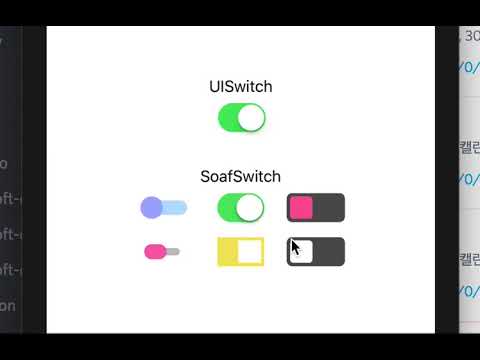
(click to view SoafSwitch Demo Video)
SoafSwitch is a custom view which replacing UISwitch.
SoafSwitch is focused on full customization avaliablility, so you can customize it as you designed so far.
SoafSwitch uses @IBDesignable, so you can configure the switch in Interface Builder with live preview.
How to Customize
- Note : You should specify at least Bar image/color, Thumb image/color, and Thumb Size to get actual view of switch.
- Drag a View into your xib view. This will became a switch.
- Open Identity inspector, set view's class as
SoafSwitch.
then.. try one of the them!
In Interface Builder
If you want to customize in Interface Builder, continue to Attributes Inspector and ta-da-! Now Customize as you want!
In Swift
If you installed SoafSwitch with Cocoapods, you should implement this code first to use SoafSwitch.
import SoafSwitch- Make an @IBOutlet connection with SoafSwitch View.
class ViewController: UIViewController{
    @IBOutlet weak var soafSwitch: SoafSwitch!

    ...
}
Example
To run the example project, clone the repo, and run pod install from the Example directory first.
Requirements
- Xcode
Installation
Install using Cocoapods
SoafSwitch is available through CocoaPods. To install it, simply add the following line to your Podfile:
pod 'SoafSwitch'Cocoapods 1.5.0v~ issue
@IBDesignable has a problem with Cocoapods version after 1.5.0
To workaround this, add following code in your podfile.
# Workaround for Cocoapods issue #7606
post_install do |installer|
    installer.pods_project.build_configurations.each do |config|
        config.build_settings.delete('CODE_SIGNING_ALLOWED')
        config.build_settings.delete('CODE_SIGNING_REQUIRED')
    end
end
Original solution from : soleares
Manually Install
Simply, add SoafSwitch.swift file in your project.
Author
Cyanide7523, [email protected]
License
SoafSwitch is available under the MIT license. See the LICENSE file for more info.