rokt-webview-sdk-ios
The RoktWebView SDK for iOS is a custom WebView that opens Rokt links in an external browser instead of in the same WebView.
For more information, please visit here
Usage
The below instructions assume that you are replacing the WKWebView for iOS with the Rokt WebView. The overall process is very simple to complete and the exact approach will depend on whether the WebView is initialised programmatically or not.
Step 1: Add the Rokt WebView SDK pod to the pod file
Add the Rokt WebView SDK pod to the pod file
use_frameworks!
pod 'RoktWebViewSDK'
Step 2: Add the Rokt WebView SDK to your layout
In storyboard, replace WKWebView with RoktWKWebView Custom Class.
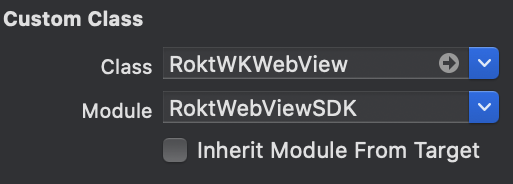
Alternatively, the Rokt WebView SDK can be added programmatically in your code. For example:
Swift
import RoktWebViewSDK
...
var roktWKWebView = RoktWKWebView(frame: self.view.frame)
Objective-C
#import <RoktWebViewSDK/RoktWebViewSDK-Swift.h>
...
RoktWKWebView *roktWKWebView = [[RoktWKWebView alloc] initWithFrame:self.view.frame];
Step 3: Load a web page
To load a web page in the RoktWKWebView, use load() for Swift or loadRequest() for Objective-C.
Swift
roktWKWebView.load(URLRequest(url: URL(string: "https://www.rokt.com")!))
Objective-C
NSURL *nsurl=[NSURL URLWithString:@"https://www.rokt.com"];
NSURLRequest *nsrequest=[NSURLRequest requestWithURL:nsurl];
[roktWKWebView loadRequest:nsrequest];
Testing locally
- Download the source code locally
- Run the
RoktWebViewSDK.xcworkspaceproject inExample
Releasing
- Open
RoktWebViewSDK.podspecand updates.versionto the new release version - Raise a PR targetting the latest
release-x.xbranch - After the build resolves, approve the
holdjob. This automatically runs thepublishjob which pushes your changes toCocoapods
License
Please see LICENSE