RBStatefulTableViewController 1.0.0
| TestsTested | ✗ |
| LangLanguage | Obj-CObjective C |
| License | MIT |
| ReleasedLast Release | May 2015 |
Maintained by Rob Booth.
- By
- eoghain
I created this controller because I was tired of building table views only to finish my work and realize that I'd completely forgotten to take into account that my data needed to be loaded, or heaven forbid that my table view would be displayed without any data. I also didn't want to have to completely throw away the work I'd done on the happy path. Then it occurred to me that by changing the delegate and datasource class for my table views I could effectively change the state with very little work. So I started building RBStatefulTableViewController. The controller is very basic, it keeps a list of all states, and when a transition is requested it calls the leaveState on the current state object, then moves the datasource and delegate of the table view to the requested state, and finally enterStateWithData: on the state that was requested. It does all of these calls within a beginUpdates / endUpdates block on the tableview so all animations happen seamlessly.
This controller doesn't include any logic about what states can transition to others, that is all left in the hands of the implementor. We just take care of the move and help you think about your setup in a different way.
Setup
Storyboard
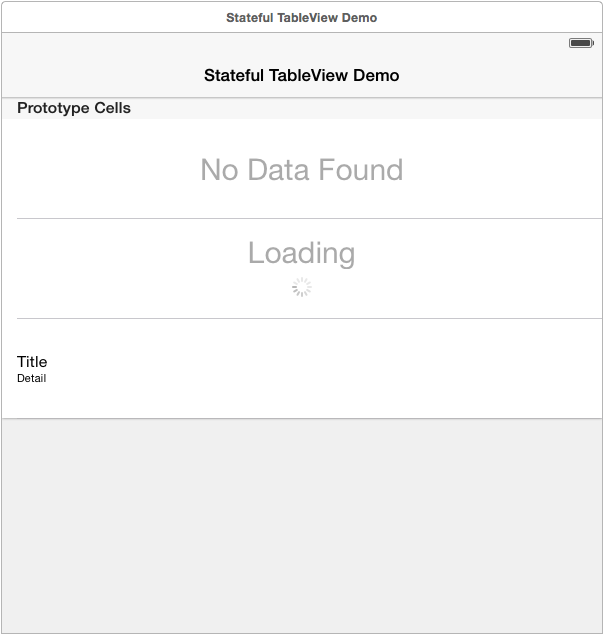
Add your prototype cells to the storyboard, don't forget to set the Identifier.
State
Create a state object for each state your table view can get into. Your state objects need to implement the StatefulTableViewStateProtocol, UITableViewDatasource and UITableViewDelegate required methods.
The basics of a StateObject are to add all rows that this object controls in the enterStateWithData: method and remove them in the leaveState method. The RBStatefulTableViewController will call these methods when it transitions between the various states. Since UITableView already knows how to deal with adding/removing rows, as long as each state is consistent between the enter and leave calls your table view will display data appropriately.
#import "EmptyState.h"
#import "StateDemoTableViewController.h"

@implementation EmptyState

#pragma mark - StatefulTableViewStateProtocol

- (void)enterStateWithData:(id)data
{
    // Add our rows
    [self.tableView insertRowsAtIndexPaths:@[ [NSIndexPath indexPathForRow:0 inSection:0] ] withRowAnimation:UITableViewRowAnimationBottom];
    [self.tableView setAllowsSelection:NO];
}

- (void)leaveState
{
    // Remove our rows
    [self.tableView deleteRowsAtIndexPaths:@[ [NSIndexPath indexPathForRow:0 inSection:0] ] withRowAnimation:UITableViewRowAnimationTop];
    [self.tableView setAllowsSelection:YES];
}

#pragma mark - UITableViewDatasource

- (NSInteger)numberOfSectionsInTableView:(UITableView *)tableView
{
    return 1;
}

- (NSInteger)tableView:(UITableView *)tableView numberOfRowsInSection:(NSInteger)section
{
    return 1;
}

- (UITableViewCell *)tableView:(UITableView *)tableView cellForRowAtIndexPath:(NSIndexPath *)indexPath
{
    UITableViewCell * cell = [tableView dequeueReusableCellWithIdentifier:@"EmptyState"];
    return cell;
}

- (CGFloat)tableView:(UITableView *)tableView heightForRowAtIndexPath:(NSIndexPath *)indexPath
{
    return tableView.frame.size.height; // Make cell take up full height
}

#pragma mark - UITableViewDelegate

@end
Controller
Create your controller and add all of the states that it will manage. Don't forget to transition to your initial state.
#import "StateDemoTableViewController.h"
#import "EmptyState.h"
#import "LoadingState.h"
#import "PopulatedState.h"


NSString * STATE_DEMO_EMPTY_STATE = @"emptyState";
NSString * STATE_DEMO_LOADING_STATE = @"loadingState";
NSString * STATE_DEMO_POPULATED_STATE = @"populatedState";

@implementation StateDemoTableViewController

- (void)viewDidLoad
{
    [super viewDidLoad];
    [self setState:[[EmptyState alloc] init] forKey:STATE_DEMO_EMPTY_STATE];
    [self setState:[[LoadingState alloc] init] forKey:STATE_DEMO_LOADING_STATE];
    [self setState:[[PopulatedState alloc] init] forKey:STATE_DEMO_POPULATED_STATE];
    [self transitionToState:STATE_DEMO_LOADING_STATE withData:nil];
}

@end