LMArticleViewController 1.6
| TestsTested | ✗ |
| LangLanguage | Obj-CObjective C |
| License | MIT |
| ReleasedLast Release | Apr 2017 |
Maintained by Luca Mozzarelli.
| Depends on: | |
| ColorArt | >= 0 |
| TLYShyNavBar | >= 0 |
| IDMPhotoBrowser | >= 0 |
- By
- Luca Mozzarelli
This framework allows you to create Apple News-inspired UIViewControllers with ease.
It is heavily inspired by MRArticleViewController, in fact the core is a simple translation of it. However I added some features I thought could be useful.
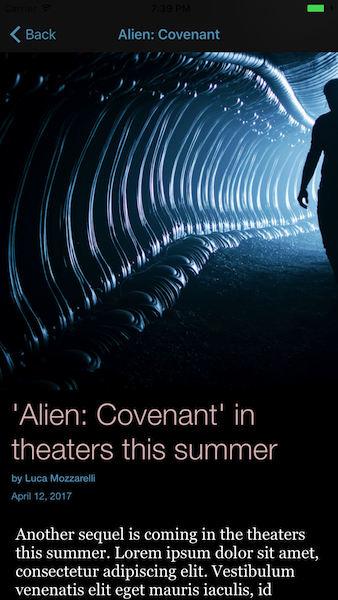
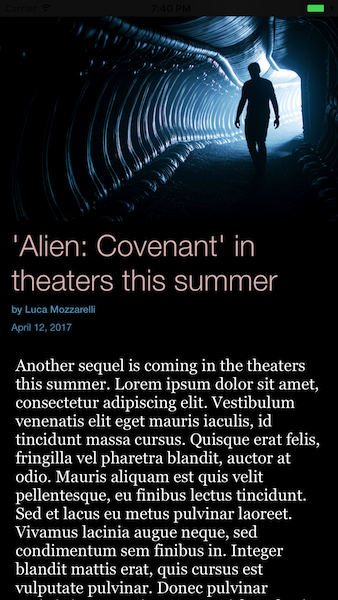
Features
The layout is shown in the images above, here's some extra features.
Animations
- [x] The navigation bar shrinks when you scroll down.
- [x] The image view stretches when the scrollview bounces ( just like Facebook's Instant Articles).
Appereance
- [x] You can set custom fonts for all the text.
- [x] Supports
NSAttributedStringin the body. - [x] Supports automatic background color and automatic light/dark text color.
Installation
LMArticleViewController is available through CocoaPods. Simply add the following line to your Podfile.
pod 'LMArticleViewController'Usage
You can either subclass LMArticleViewController and set the contents in the viewDidLoad: method or instantiate an LMArticleViewController object, set its properties and present it.
Case A: Subclass
- (void)viewDidLoad {

    // Set custom fonts
    // Size doesn't matter here, the super class overrides with default values
    [self setHeadlineFont:[UIFont fontWithName:@"Nexa Bold" size:1]];
    [self setAuthorFont:[UIFont fontWithName:@"Roboto-Regular" size:1]];
    [self setDateFont:[UIFont fontWithName:@"Roboto-Regular" size:1]];

    // Set contents
    self.headline       = self.dataDictionary[k_TITLE];
    self.image          = self.dataDictionary[k_IMAGE];
    self.author         = self.dataDictionary[k_AUTHOR];
    self.attributedBody = self.dataDictionary[k_BODY];
    self.date           = self.dataDictionary[k_DATE];

    // IMPORTANT! Setup must happen before [super viewDidLoad]!!
    [super viewDidLoad];

}
Case B: Init and push
- (void)openArticleWithContents:(NSDictionary *)dataDictionary {

    LMArticleViewController* articleViewController = [[LMArticleViewController alloc]init];

    [articleViewController setBodyFont:[UIFont fontWithName:@"Roboto-Medium" size:1]];

    articleViewController.headline       = dataDictionary[k_TITLE];
    articleViewController.image          = dataDictionary[k_IMAGE];
    articleViewController.author         = dataDictionary[k_AUTHOR];
    articleViewController.attributedBody = dataDictionary[k_BODY];
    articleViewController.date           = dataDictionary[k_DATE];

    [self.navigationController pushViewController:articleViewController animated:YES];
}
To-Do List
- [ ] Adjust image view size and proportions.