IGLDropDownMenu 1.6.2
| TestsTested | ✗ |
| LangLanguage | Obj-CObjective C |
| License | MIT |
| ReleasedLast Release | Sep 2016 |
Maintained by Galvin Li.
IGLDropDownMenu 1.6.2
- By
- Galvin Li
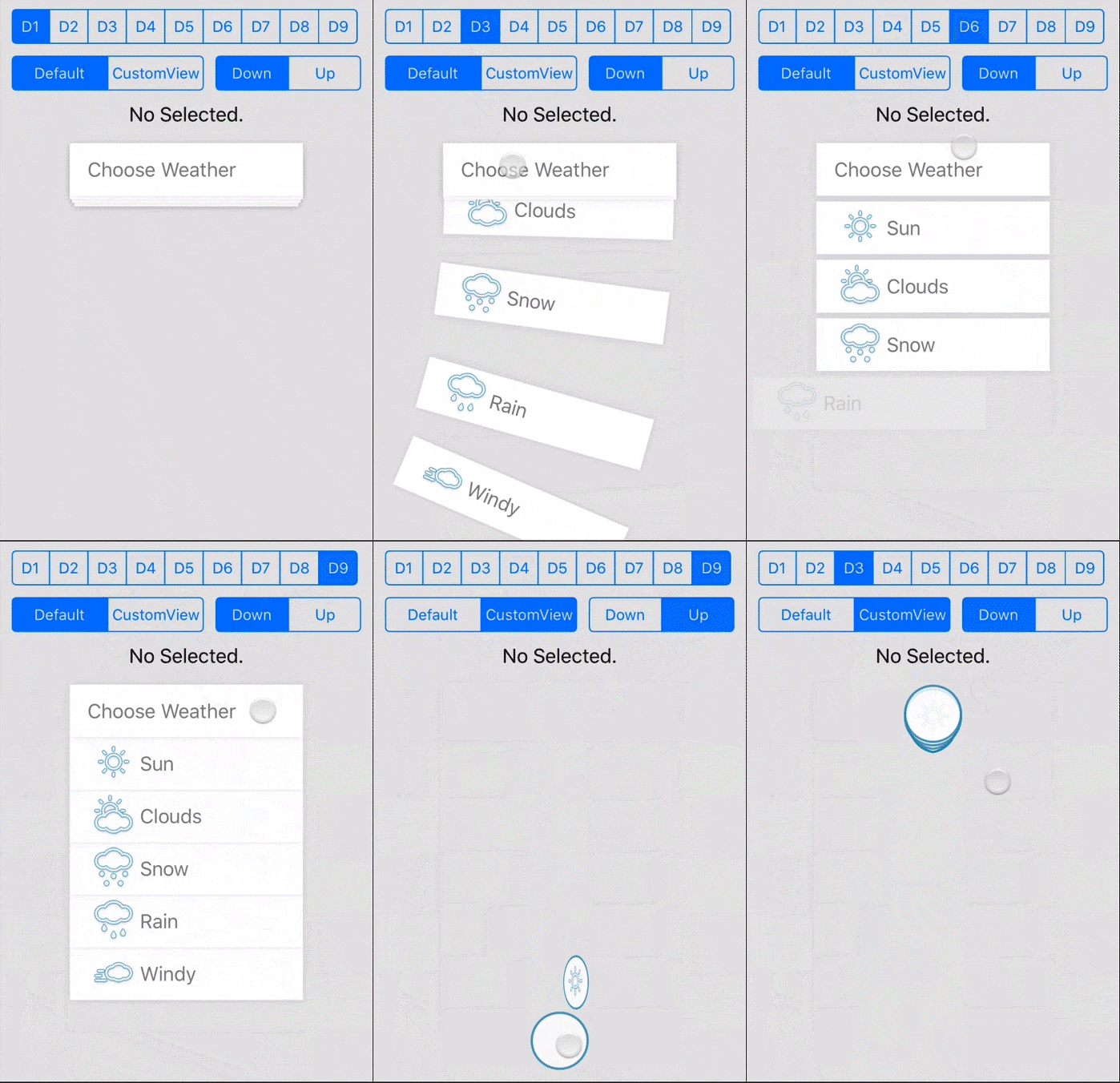
An iOS drop down menu with pretty animation.
Screenshot
How To Use
Manual Install:
Just drap the files in folder IGLDropDownMenu to your project.
!Try the demo. It's really helpful!
Sample Code
-
Create your
IGLDropDownItemarray and set upNSMutableArray *dropdownItems = [[NSMutableArray alloc] init]; IGLDropDownItem *item = [[IGLDropDownItem alloc] init]; [item setIconImage:[UIImage imageNamed:@"icon.png"]]; [item setText:@"title"]; [dropdownItems addObject:item];
-
Create your
IGLDropDownMenuand set the up the parameter namedropDownItemsIGLDropDownMenu *dropDownMenu = [[IGLDropDownMenu alloc] init]; [dropDownMenu setFrame:CGRectMake(0, 0, 200, 45)]; dropDownMenu.menuText = @"Choose Weather"; dropDownMenu.menuIconImage = [UIImage imageNamed:@"chooserIcon.png"]; dropDownMenu.paddingLeft = 15; // padding left for the content of the button
-
modify the params of
IGLDropDownMenudropDownMenu.type = IGLDropDownMenuTypeStack; dropDownMenu.gutterY = 5; dropDownMenu.itemAnimationDelay = 0.1; dropDownMenu.rotate = IGLDropDownMenuRotateRandom;
-
Call the
reloadViewmethod (Very Important!)// every time you change the params you should call reloadView method [dropDownMenu reloadView];
Parameters
These are just some of the parameters you can use, you can find more(or make more) in the code.
For IGLDropDownMenu
-
animationDurationset the duration(s) of the animation in second -
animationOptionset the UIViewAnimationOptions for the animation itemAnimationDelayset the delay(s) before each of item start to animate-
directionset the direction when the menu expand-
IGLDropDownMenuDirectionDowndefault value, expand downward -
IGLDropDownMenuDirectionUpexpand upward
-
-
rotateset the rotate style when the menu on expand-
IGLDropDownMenuRotateNonedefault value, for no rotate -
IGLDropDownMenuRotateLeftrotate to left on expand -
IGLDropDownMenuRotateRightrotate to right on expand -
IGLDropDownMenuRotateRandomrotate random on expand every single time
-
-
typeset the menu type (remember when you set the type to SlidingIn* you can't have the rotate type at the same time.)-
IGLDropDownMenuTypeNormaldefault value, item will hide behind the menu button on fold -
IGLDropDownMenuTypeStackitem will hide behind the menu button and make a stack like look -
IGLDropDownMenuTypeSlidingInBothitem will slide in and out from both sides -
IGLDropDownMenuTypeSlidingInFromLeftitem will slide in from left -
IGLDropDownMenuTypeSlidingInFromRightitem will slide in from right -
IGLDropDownMenuTypeFlipVerticalitem will flip vertical -
IGLDropDownMenuTypeFlipFromLeftitem will flip from left -
IGLDropDownMenuTypeFlipFromRightitem will flip from right
-
slidingInOffsetset the offset value for the items slide in and out-
gutterYset the Y gutter between items -
alphaOnFoldset the item alpha value when menu on fold, only use this when the style won't fit your mind -
flipWhenToggleViewwhen you set this to true, the menu button will flip up when you click -
useSpringAnimationuse the spring animation for iOS7 or higher version, default is true -
menuButtonStatickeeps the menu button static regardless of selected menu item, default is NO
For IGLDropDownItem
-
iconImageset the icon image for the item -
textset the text string for the item -
textLabelfor you to adjust the text label style -
objectyou can store your custom item in this property -
indexthe item index -
paddingLeftthe left padding of the image view or only text -
showBackgroundShadowyou can hide the drop down shadow with this property -
backgroundColoryou can change the background color with this property
Remember the menuButton in IGLDropDownMenu is also an IGLDropDownItem.
CustomView
If you want to control the view by yourself, you can use the initWithMenuButtonCustomView of IGLDropDownMenu and initWithCustomView of IGLDropDownItem.
If you use customView, the customView will auto set userInteractionEnabled = NO and the menu menuButtonStatic = YES and some style parameters will be invalid. You need to handle it yourself. I make a customView in the demo, try it!
Delegate
For IGLDropDownMenu
- (void)dropDownMenu:(IGLDropDownMenu*)dropDownMenu selectedItemAtIndex:(NSInteger)index;- (void)dropDownMenu:(IGLDropDownMenu *)dropDownMenu expandingChanged:(BOOL)isExpending;
Requirements
- target platform: >=iOS 6.0 (I never test the version below 6.0, maybe you can make some try and tell me.)
- ARC
Thanks
This drop-down menu idea is come from here, I found this demo one day and just implement it on iOS.
License
The MIT License (MIT)
Copyright (c) 2014 Galvin Li
Permission is hereby granted, free of charge, to any person obtaining a copy of this software and associated documentation files (the "Software"), to deal in the Software without restriction, including without limitation the rights to use, copy, modify, merge, publish, distribute, sublicense, and/or sell copies of the Software, and to permit persons to whom the Software is furnished to do so, subject to the following conditions:
The above copyright notice and this permission notice shall be included in all copies or substantial portions of the Software.
THE SOFTWARE IS PROVIDED "AS IS", WITHOUT WARRANTY OF ANY KIND, EXPRESS OR IMPLIED, INCLUDING BUT NOT LIMITED TO THE WARRANTIES OF MERCHANTABILITY, FITNESS FOR A PARTICULAR PURPOSE AND NONINFRINGEMENT. IN NO EVENT SHALL THE AUTHORS OR COPYRIGHT HOLDERS BE LIABLE FOR ANY CLAIM, DAMAGES OR OTHER LIABILITY, WHETHER IN AN ACTION OF CONTRACT, TORT OR OTHERWISE, ARISING FROM, OUT OF OR IN CONNECTION WITH THE SOFTWARE OR THE USE OR OTHER DEALINGS IN THE SOFTWARE.