B68UIFloatLabelTextField 0.1.2
| TestsTested | ✗ |
| LangLanguage | SwiftSwift |
| License | MIT |
| ReleasedLast Release | Jun 2015 |
| SPMSupports SPM | ✗ |
Maintained by Dirk Fabisch.
B68UIFloatLabelTextField 0.1.2
- By
- Dirk Fabisch
- dirkfabisch
B68FloatingLabelTextField
Swift implementation of the Float Label Design Pattern by Matt D. Smith as a sub call from UITextField
Implementing an input field for a device with limited screen estate is challenging. Matt has developed an pattern for combining a placeholder text wit a floating label if needed.

I implemented the pattern in SWIFT and enabled some of the internal propertiers in Xcode 6 Interface Builder (see screenshot)
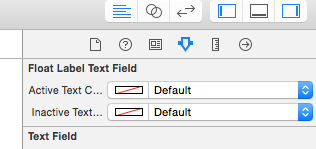
Exposed Properties
- Active Color: Text color of the floating label if focused
- Inactive Color: Text Color of the floating label if unfocused
Installation
Manual
Just clone and add B68UIFloatLabelTextField.swift to your project.
Requirements
- iOS 7.0+ (8.0+ if you use Cocoapods)
- Xcode 6.3
- Swift 1.2
License
MIT
Based on the Objectiv-C implementations from: